


Elevate Your Images with AI: Free Face Swaps and Image Unblurring
In today’s world, where visual content is king, having high-quality, clear, and engaging images is essential. Whether you're improving old photos, creating viral social media content, or preparing professional images, AI tools can simplify and elevate the editing process.
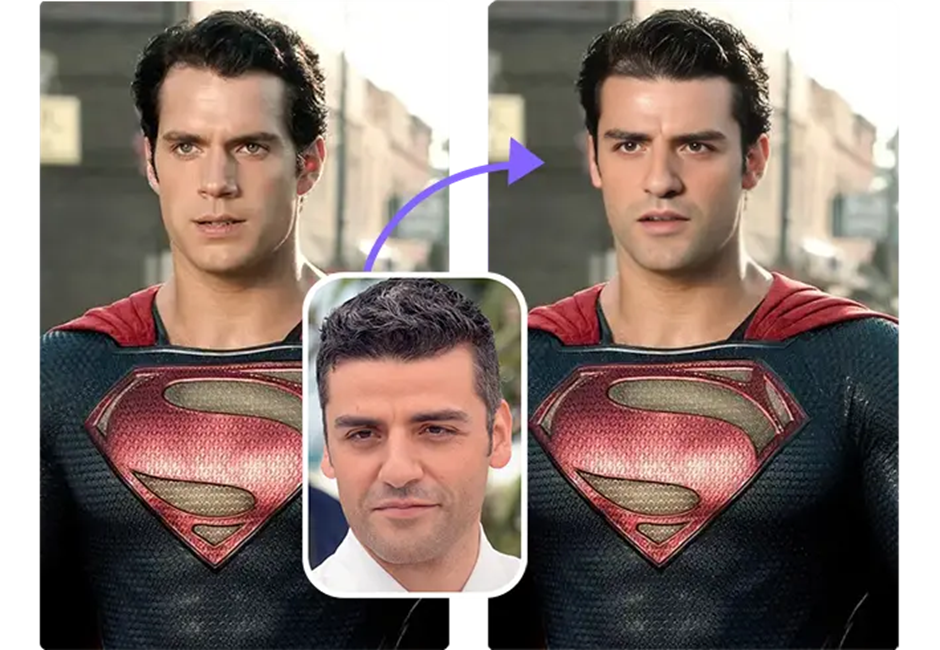
Two incredibly useful tools in the image-editing world are AI Face Swap and AI Image Unblurring. Let’s dive into how these tools work, how they compare to other options, and why they’re becoming essential for creators and businesses alike.
Free AI Face Swap: A Fun Way to Transform Faces in Photos
The rise of face-swapping in the digital age has opened up a world of creative possibilities. Whether for memes, entertainment, or even marketing, face-swapping can make an image stand out, grab attention, and evoke laughter.
The Free AI Face Swap Tool allows users to upload photos and swap faces effortlessly. The AI uses deep learning algorithms to match facial features from different images and seamlessly merge them, creating a believable face swap. This is perfect for:
- Creating fun and viral social media content
- Swapping faces in family photos for a humorous effect
- Transforming portraits or profile pictures for a fresh look
Competitor Comparison for Face Swap Tools
| Tool | Strength | Common Limitation | Why Ez-style tools stand out |
| Reface App | Fast, fun, and easy to use | Needs high-quality source images | More flexibility and better results with varied photos |
| FaceApp | Popular for facial transformations | Limited free access | Quick, seamless swaps with no sign-up required |
| Zao | High-quality results, popular in Asia | Limited functionality for photo-to-video swaps | More control over face swaps, no region restrictions |
| Reflect.tech | Realistic face-swapping | Sometimes requires additional manual tweaks | Instant swaps that work for almost any photo |
Why it’s perfect for creators:
Free AI Face Swap makes swapping faces fun and accessible, especially for creators who want to produce engaging, shareable content. With no complex editing tools needed, this AI tool offers fast and realistic face-swapping for any photo in minutes.
Unblur Image: Restore Sharpness and Detail in Blurry Photos
We've all been there: a great shot, but the image is a bit blurry. Whether it’s from a shaky hand, poor focus, or low resolution, blurry images are frustrating and difficult to work with. Fortunately, AI-powered unblurring tools are here to help.
AI Image Unblurring Tools analyze blurry photos and use machine learning to fill in missing details, enhancing the sharpness and clarity of the image. For example, Unblur Image allows you to easily unblur and restore old or poorly focused images with just a few clicks. Whether it's an old family photo, a product shot, or a casual snapshot, this tool can make it look professional again.
Competitor Comparison for Image Unblurring Tools
| Tool | Strength | Common Limitation | Why Ez-style tools stand out |
| Topaz Sharpen AI | Excellent for high-quality detail restoration | Paid-only tool | Free and quick solution with easy access for all users |
| Fotor Unblur | Simple interface for beginners | Limited fine-tuning options | More advanced unblurring with high-quality, free output |
| Enhance.Pho.to | Basic image enhancement tools | Limited customizations | Free, fast, and effective for standard image repairs |
| PineTools | Simple and easy-to-use interface | Lacks advanced features | Fast processing and no need for advanced skills |
Why it’s essential for creators:
Unblur Image is a lifesaver for creators who work with photos from smartphones or older cameras. It quickly fixes blurry shots and restores clarity, making it ideal for professional and personal projects where sharp visuals are crucial.
How These AI Tools Enhance Your Creative Workflow
The combination of AI Face Swap and AI Unblurring is incredibly powerful for anyone working with images. Here’s how you can integrate both tools into your creative workflow:
- Start with a photo: Use your original image, whether it’s a family portrait, selfie, or product shot.
- Swap faces with the AI Face Swap tool for fun or creative adjustments, or for content that needs different facial expressions or subjects.
- Unblur the image using the Unblur Image tool, restoring clarity and sharpness for the final version.
- Finalize and export: Once the image is sharpened and enhanced, you can use it for whatever project you need—social media, presentations, or e-commerce.
This combination of tools gives you creative control over every image, ensuring the best possible quality while saving valuable time.
Why These AI Tools Are Changing Image Editing
AI is revolutionizing the way we think about image editing. With Face Swap and Unblurring, there’s no longer a need for complicated software or long hours of editing. These tools are:
- Fast: Achieve professional results in minutes, not hours.
- User-friendly: No technical skills required—just upload your image and let the AI handle the rest.
- Effective: Get high-quality results every time, even if your original image isn’t perfect.
AI-powered tools are democratizing image editing, making professional-quality content accessible to everyone, whether you’re a business owner, marketer, or casual user.
Final Thoughts
AI is not just for tech experts anymore. AI Face Swap and Unblur Image have made high-quality image editing accessible and easy for everyone. These tools allow you to have fun with your images, fix blurry shots, and create professional-looking visuals without spending hours in complicated software.
As a creator, having access to these tools means you can focus on being creative instead of being bogged down by technical details. Whether you’re improving a product photo or creating engaging social media content, AI is helping you do it all faster, more effectively, and with greater ease.


